
I made an adaptation of Slop Detector: while browsing X or LinkedIn, a decision model judges the text currently on screen, and the extension stamps, fades or hides it according to my settings.
It is a small tool with a concrete use for a decision model: judge a piece of content, then let software act on that judgment.
The credit comes first. The original Slop Detector is by Robin Bilgil. I forked it, connected EvoLink Luna Decision, and added Chinese/English controls and an adjustable threshold. Feed extraction, caching and display modes build on the original work. My adaptation is on GitHub, with the original attribution and MIT license retained.
Why use a decision model in a feed?
The reading problem I wanted to address is familiar: a post can look complete and still leave you with very little new information. Stock phrases, repetitive marketing templates and sweeping claims without specifics can all consume attention.
In this tool, the decision model receives the post text and a judgment question, then returns a probability for that question. The extension uses EvoLink’s gpt-6-luna-decisions, reads the native predicate probability and compares it with a threshold. It does not generate a review and then try to extract a score from the prose.
The default question asks whether the post is automated, AI-generated or otherwise low-effort and offers little value. You can edit it under Prompt to bring the judgment closer to your own reading preferences.
That wording has a limitation: whether a post is AI-generated and whether it offers value are different questions. AI-assisted writing can be useful; a human-written post can be empty. I use this as a personal reading filter. A Slop label does not prove that the author used AI, or settle the quality of their work.
The same approach could be tried for comment triage, lead classification or content routing. Those are possible extensions of the idea; this extension currently filters text on X and LinkedIn.
What does it look like? Two X recordings
These two recordings show feed excerpts from sessions using the Chinese and English interfaces. You can play both here.
As the page scrolls, some posts receive a red SLOP stamp while others keep their original appearance. That makes the result visible without removing the text, so I can inspect a judgment I disagree with.
Both recordings show X. The extension also supports LinkedIn, but these clips do not demonstrate a live LinkedIn session. They are not an accuracy benchmark with human-labeled examples, and do not establish detection accuracy, per-post latency or cost.
For a first try, I suggest Stamp or Fade out. Keep the text available, see whether the judgments suit your preferences, and then decide whether to use Hide.
Step 1: Clone and build the extension
You need Chrome 120 or newer, Git, Node 24.18 or newer within the 24.x line, and npm. The repository currently requires Node 24.x; switch versions first if you only have Node 22 or 25.
Run these commands in a terminal:
shgit clone https://github.com/cheercheung/slop-detector.git cd slop-detector npm ci npm run build
A successful build creates the dist folder. That is what you load next. This guide installs from source, rather than through the Chrome Web Store.
Step 2: Enable developer mode and load dist
- Enter
chrome://extensions/in Chrome’s address bar. - Turn on Developer mode at the upper right.
- Click Load unpacked at the upper left.
- Select the
distfolder inside the cloned repository. Do not select the source root or a ZIP file. - Pin Slop Detector through the browser toolbar’s extensions menu so you can open it easily.
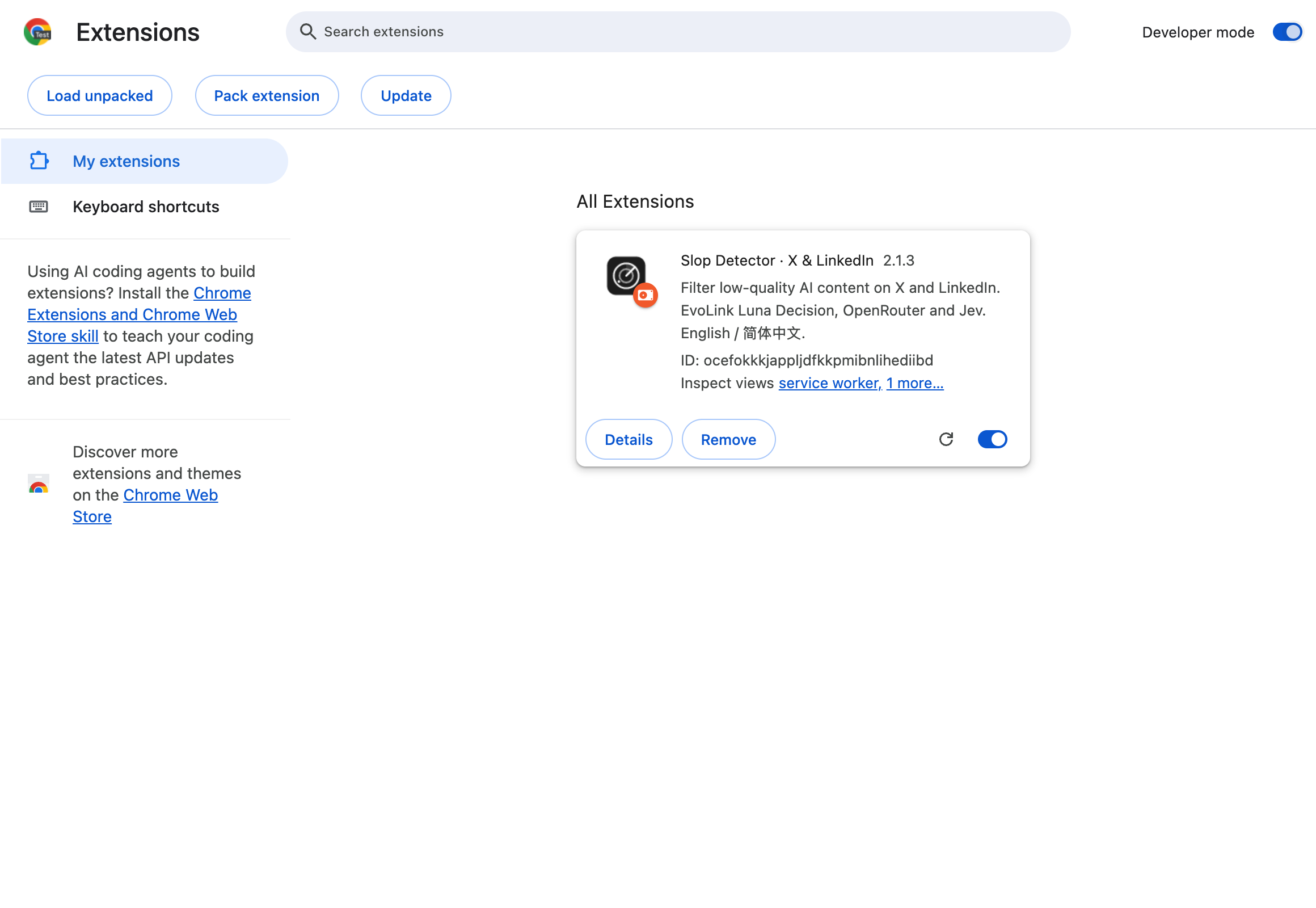
This screenshot uses a separate Chrome for Testing profile with only this extension loaded. Follow the same controls in your own Chrome. Google also documents loading an unpacked extension.
Step 3: Get an EvoLink key and connect
Open the extension popup and choose Decision model → EvoLink Luna Decision. This is the default provider on a fresh install. The Language selector at the top switches between English and Simplified Chinese.
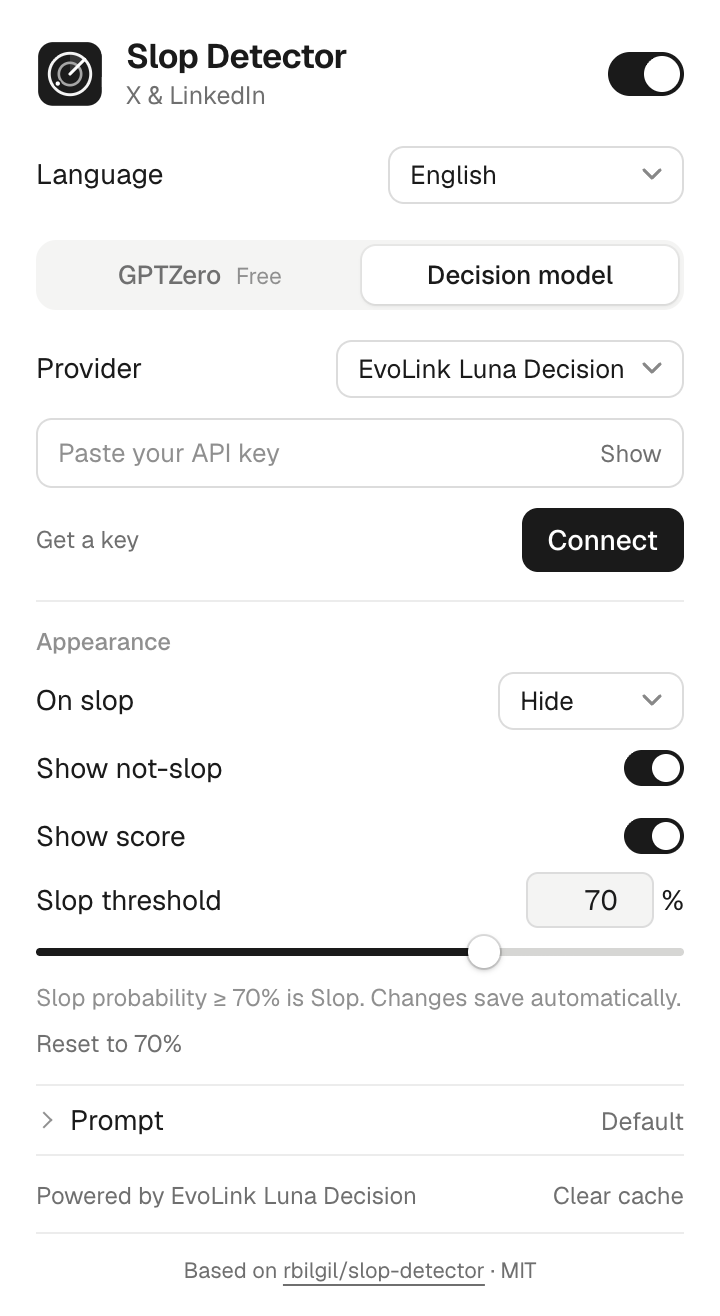
- Click Get a key to open the EvoLink API key dashboard.
- Sign in to your account, create and copy an API key, and check that the account has available credit.
- Return to the extension and paste the key into API Key.
- Click Connect. If Chrome requests provider access, allow access to
direct.evolink.ai. - Wait until the popup shows Connected, then test the feed.
You do not need an .env file or a key in the source code. The screenshot deliberately leaves the field empty. Enter your key yourself and keep it out of screenshots, articles and GitHub.
Connecting sends a synthetic sample request and may incur an API charge. Connected means the connection check passed; the next check is whether actual feed results appear. If connection fails, check the provider, key, available credit and Chrome permissions.
Step 4: Choose a display mode and start browsing
After connecting, try these settings:
| Setting | A useful starting point | Purpose |
|---|---|---|
| Top switch | On | Enable detection |
| On slop | Stamp or Fade out | Keep the original text for review |
| Show score | On | See the model’s probability |
| Show not-slop | Optional | Inspect posts below the threshold too |
| Slop threshold | Start at 70% | Give yourself a comparison point |
The initial display mode shown in the screenshot is Hide. After connecting, change it to Stamp or Fade out if you want to inspect results first. Refresh X or LinkedIn and scroll to the posts you want to read. The extension processes currently visible text posts, comments and replies. It does not scan an entire account or timeline at once, or analyze the images and videos inside a post.
The default rule is Slop probability ≥ 70%: 70% meets it; 69.9% does not. Not slop is the complementary probability. For example, Slop 80% corresponds to Not slop 20%, rather than an independent score from another model.
Raise the threshold if too much content is flagged; lower it to include more. Threshold changes reuse cached scores and update labels without requesting those cached items again just because you changed the threshold.
If you change the judgment question or want a fresh evaluation, you can clear the cache. New detection requests may incur charges. Turn off the top switch when you want to pause further detection.
What I watch for when using it
Whether mistakes are acceptable. Industry jargon, a short promotional post or a writing habit may affect the model’s judgment. If something useful gets stamped, inspect the original text and adjust the threshold or prompt.
Where the text goes. The extension sends visible post text to your selected provider, up to 6,000 characters per item. Decision requests also include your judgment prompt. The key stays in local extension storage and is not synced, but that storage is not an encrypted vault. See the repository’s privacy policy.
Settings before troubleshooting. If there are no labels, check that detection is enabled, EvoLink is connected and site access is allowed, then refresh the page. If only Not slop labels are missing, check that display switch.
To update, pull the latest repository version, run npm ci and npm run build again, reload the extension card at chrome://extensions/, and refresh the feed.
What changed in my fork
The main changes are EvoLink Luna Decision as the default provider, Chinese/English settings and feed labels, and a Slop threshold adjustable from 0% to 100%, defaulting to 70%. The original stamping, fading, hiding and caching capabilities remain.
If you want to try a decision model, a small content-judgment tool is a concrete place to start: decide what question matters, then observe whether the model’s judgments help with your actual work.
Clone my adaptation · Read the adaptation notes · Visit Robin Bilgil’s original project
SOURCE NOTE
Slop Detector 开源仓库与X 操作录屏